OXYGEN 8.2 – Enhanced Industrial Connectivity and Real-Time Performance
OXYGEN 8.2 further expands the capabilities introduced with the OXYGEN 8.x release series by enhancing real-time data exchange, industrial communication, and system usability. This update introduces EtherCAT support for the Real-Time Power Analyzer, adds native PROFINET connectivity, extends XCP performance for high-speed applications, and delivers numerous workflow improvements. Together, these enhancements make it easier to integrate OXYGEN into modern automation environments while simplifying everyday measurement tasks.
New Features
- Real-Time Power Analyzer Enhancements
- PROFINET Integration
- XCP Packed Mode
- Enhanced Control Instrument
- Meter Instrument Enhancement
- CAN Bit Order Inversion
- Adapted Logging
Real-Time Power Analyzer Enhancements
With OXYGEN 8.1, we introduced Real-Time Power Calculation for Linux-based systems, enabling low-latency power analysis with data output via UDP. Building on this functionality, OXYGEN 8.2 now adds EtherCAT as a second real-time interface, allowing seamless integration into EtherCAT-based control and automation systems.
EtherCAT offers the same high-performance characteristics as the existing UDP interface, including output rates of up to 1 kS/s with a typical I/O delay of 2 ms (4 ms maximum). To simplify integrating OXYGEN data into your EtherCAT MainDevice, you can export an ESI file for straightforward configuration. Simultaneous UDP and EtherCAT transmission is fully supported, enabling real-time measurement data to be distributed to multiple systems in parallel.
Note: This feature requires Ubuntu 24.04 and a TRION-EtherCAT-1-SLAVE module.
Besides calculated power values, OXYGEN 8.2 extends the low-latency output functionality to auxiliary channels. Within the AUX Channels section, any analog TRION(3) input channel can now be assigned to the real-time output with update rates of up to 1 kS/s. Available output modes include:
- Average – Block-wise average based on the configured cycle rate
- RMS – RMS calculation based on the configured cycle rate
- Last Value – Last acquired sample
These auxiliary channel outputs are available for both UDP and EtherCAT, enabling transmission of power values alongside additional analog measurement data.
Note: All Real-Time Power Analyzer extensions are included in the OXY-OPT-POWER-RT software option.
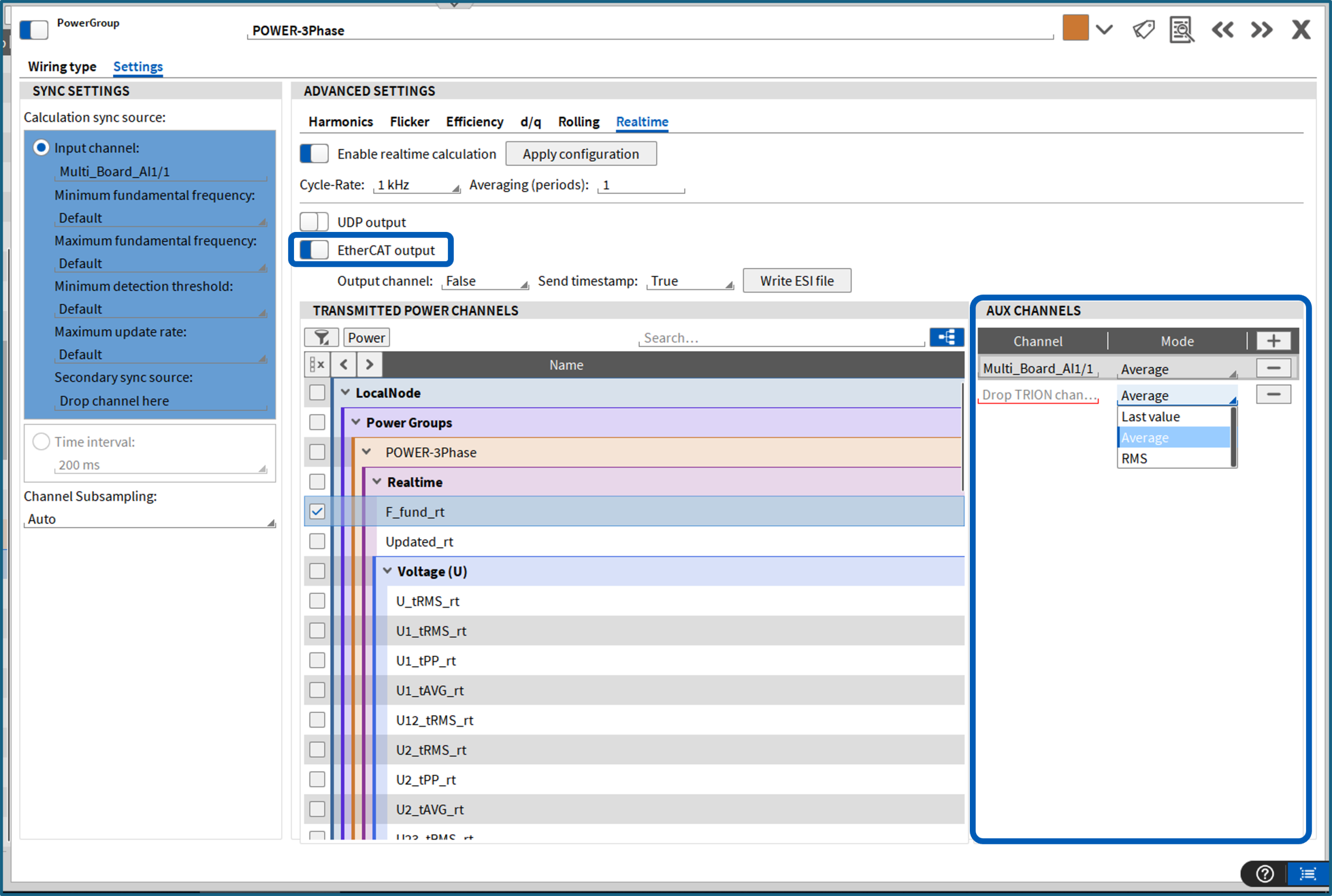
Fig. 1: Real-Time power calculations – EtherCAT output and auxiliary channels
PROFINET Integration
OXYGEN 8.2 enables the transmission of measurement data via PROFINET – a widely used Industrial Ethernet standard for automation and control applications. In a PROFINET environment, a DEWE3 chassis acts as a PROFINET IO Device (producer) and transfers measurement data to an external PROFINET IO Controller (consumer). The implementation supports the transmission of up to 100 channels with output rates of up to 500 S/s and a typical I/O delay of 200 ms. Both synchronous and asynchronous scalar channels are supported. Each transmitted value includes a relative timestamp together with the latest acquired sample.
PROFINET is configured via the Server menu in OXYGEN, where data transmission can be enabled and customized. Available configuration options include:
- Update rate: 2 to 128 ms (fixed steps of 2 ms × 2ⁿ)
- Channel selection: Defines which channels are published via PROFINET
- GSDML export: Generates the device description file required for integration into a PROFINET engineering environment
- TAG file export: Creates optional interpretation files that simplify configuration on the controller side. Exports are available as CSV for general use and as XML for direct import into TIA Portal.
To support commissioning and diagnostics, OXYGEN also provides status information for the Application, Bus, and Error states, which can be updated at any time using the Refresh button.
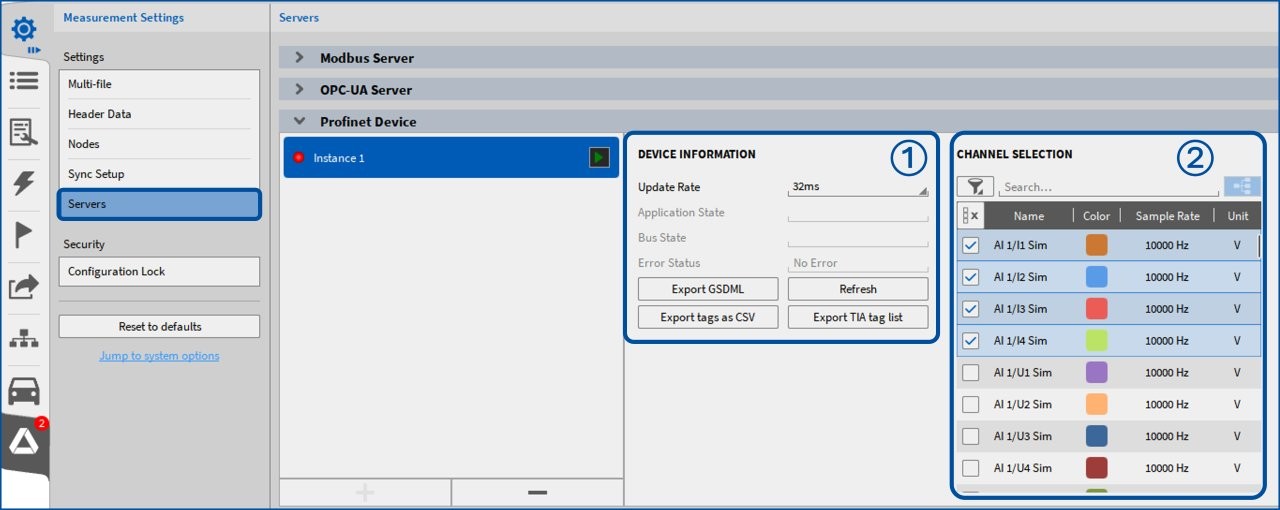
Fig. 2: Configure PROFINET data output within OXYGEN; ① Configuration options, status information, and export buttons, ② Channel selection
PROFINET functionality is currently supported on all DEWE3-chassis with Windows 10 or Windows 11 and requires the TRION-PROFINET-IO-DEVICE module.

Fig. 3: TRION-PROFINET-IO-DEVICE
XCP Packed Mode
This release extends OXYGEN’s XCP functionality with Packed Mode – a new transmission mode designed to ensure reliable data transfer at high sample rates of up to 2 MS/s. Instead of transmitting individual samples, Packed Mode combines multiple samples into a single Ethernet frame (up to 1400 bytes), maximizing bandwidth utilization and improving transmission efficiency.
To enable Packed Mode, select XCP protocol version 1.4 and configure the Maximum Packed Count, which defines the number of samples packed into each Ethernet frame. For optimal performance, this value should be calculated based on the number of transmitted channels and the data format.
Example: For 16 channels using the float data type (4 bytes per value), the Maximum Packed Count is calculated as:
1400 bytes ÷ (16 channels × 4 bytes) = 21.875 → Maximum Packed Count = 21
Packed Mode is recommended for sample rates between 100 kS/s and 2 MS/s. For lower transmission rates, below 100 kS/s, the standard XCP 1.0 protocol remains the preferred choice.
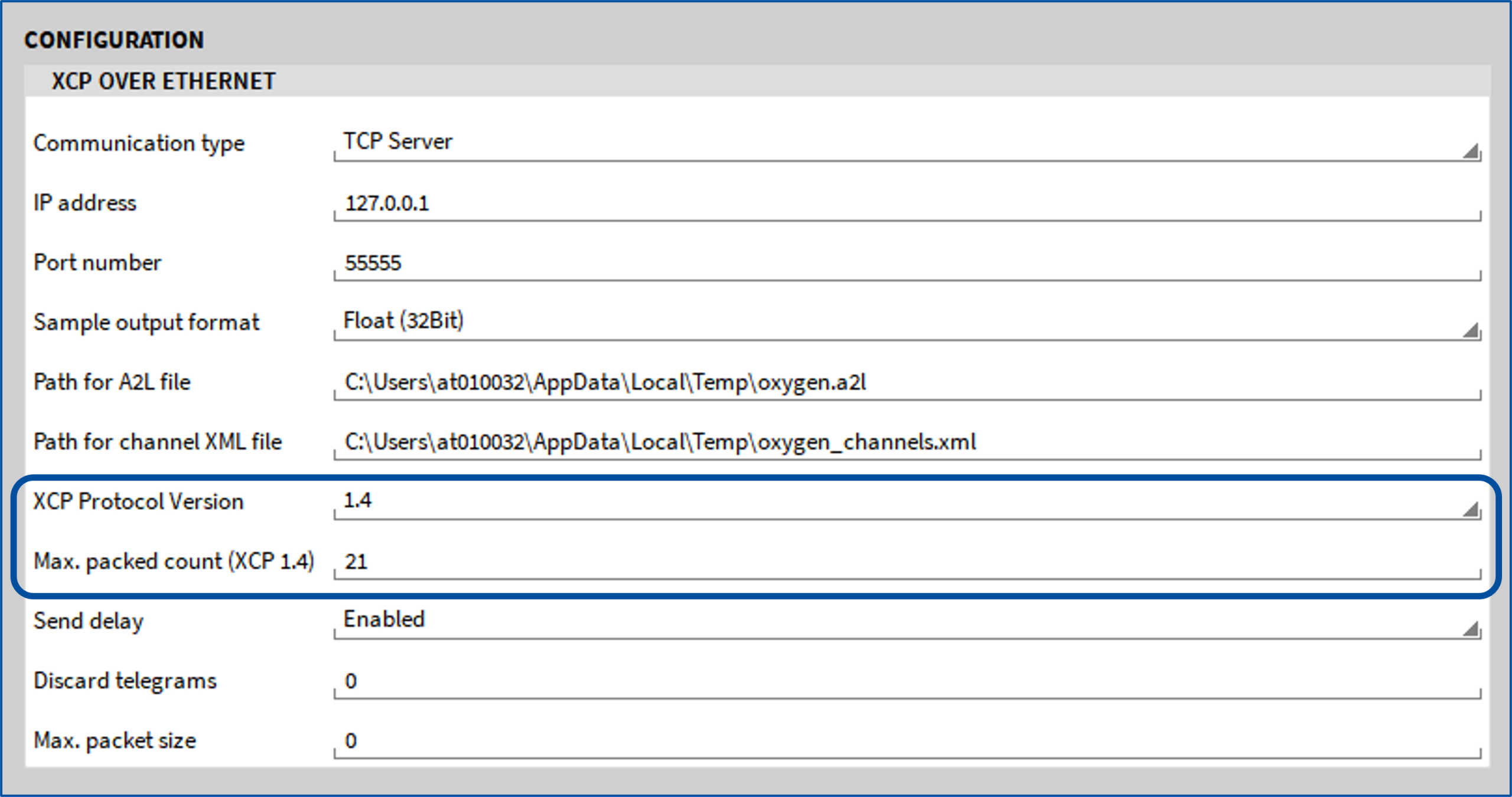
Fig. 4: XCP Packed-mode configuration
Enhanced Control Instrument
The Control Instrument has been enhanced to provide greater flexibility and more convenient channel operation. Individual channels can now be assigned directly to a Control Instrument and controlled either independently or simultaneously. If no channels are assigned, the previous behavior is retained, applying the selected control action to all compatible channels in the measurement setup. In addition, three new control types have been introduced:
- ① Digital Out State – Allows the Digital Output mode and its settings to be changed directly from the measurement screen, even during an active recording.
- ② Zero – Provides direct access to the Zero function, enabling software-based offset compensation without opening the channel settings.
- ③ Lead Wire Compensation – Enables lead wire compensation directly from the measurement screen, eliminating the need to navigate to the channel configuration. This function is available for TRION(3)-18xx-MULTI modules using 3-wire quarter-bridge channels.

Fig. 5: New control types for control instrument
Meter Instrument Enhancement
Two new enhancements improve the flexibility of the Meter Instruments, making it easier for you to visualize measurement values and status information. The first enhancement introduces multiple user-defined limit thresholds, allowing several upper and lower limits to be configured instead of a single limit pair. This functionality is available for the Digital Meter, Analog Meter, Bar Meter, and Indicator instruments. Furthermore, Indicator instruments now support images, emojis, and custom text in addition to the existing color-based visualization. This enables more intuitive dashboards that communicate measurement and system status at a glance.
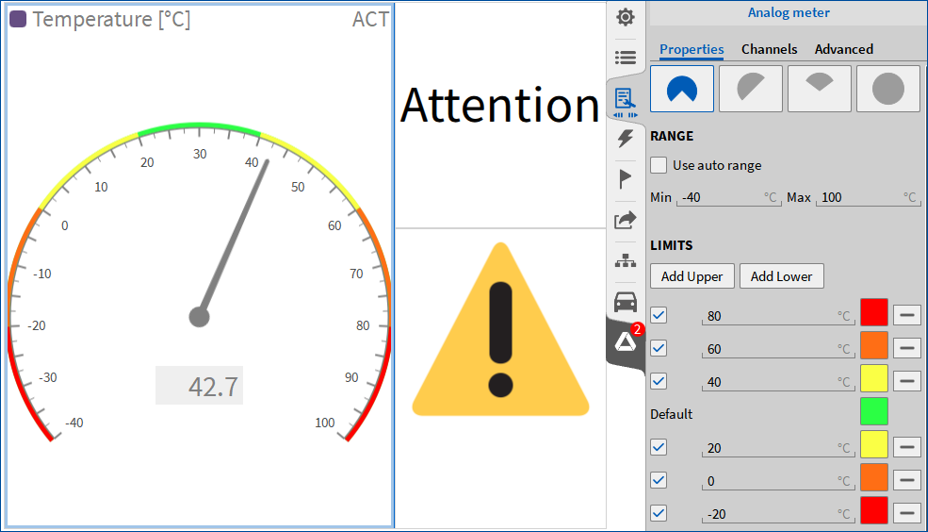
Fig. 6: Improved limits for meter instruments
Support for Inverted CAN Bit Order
OXYGEN 8.2 introduces an advanced option to invert the bit order of Intel and Motorola CAN signal formats (see Fig. 7). This feature supports applications that rely on proprietary or non-standard CAN implementations.
As bit order inversion is not part of the official Vector DBC standard, the corresponding configuration cannot be stored in a .dbc file. Consequently, this functionality is currently available for CAN message reception only. Further, to prevent unintended configuration changes and potential data interpretation errors, the feature is disabled by default. To enable it, activate Allow advanced CAN options in Advanced Settings, then enable Invert bits in the CAN message configuration.
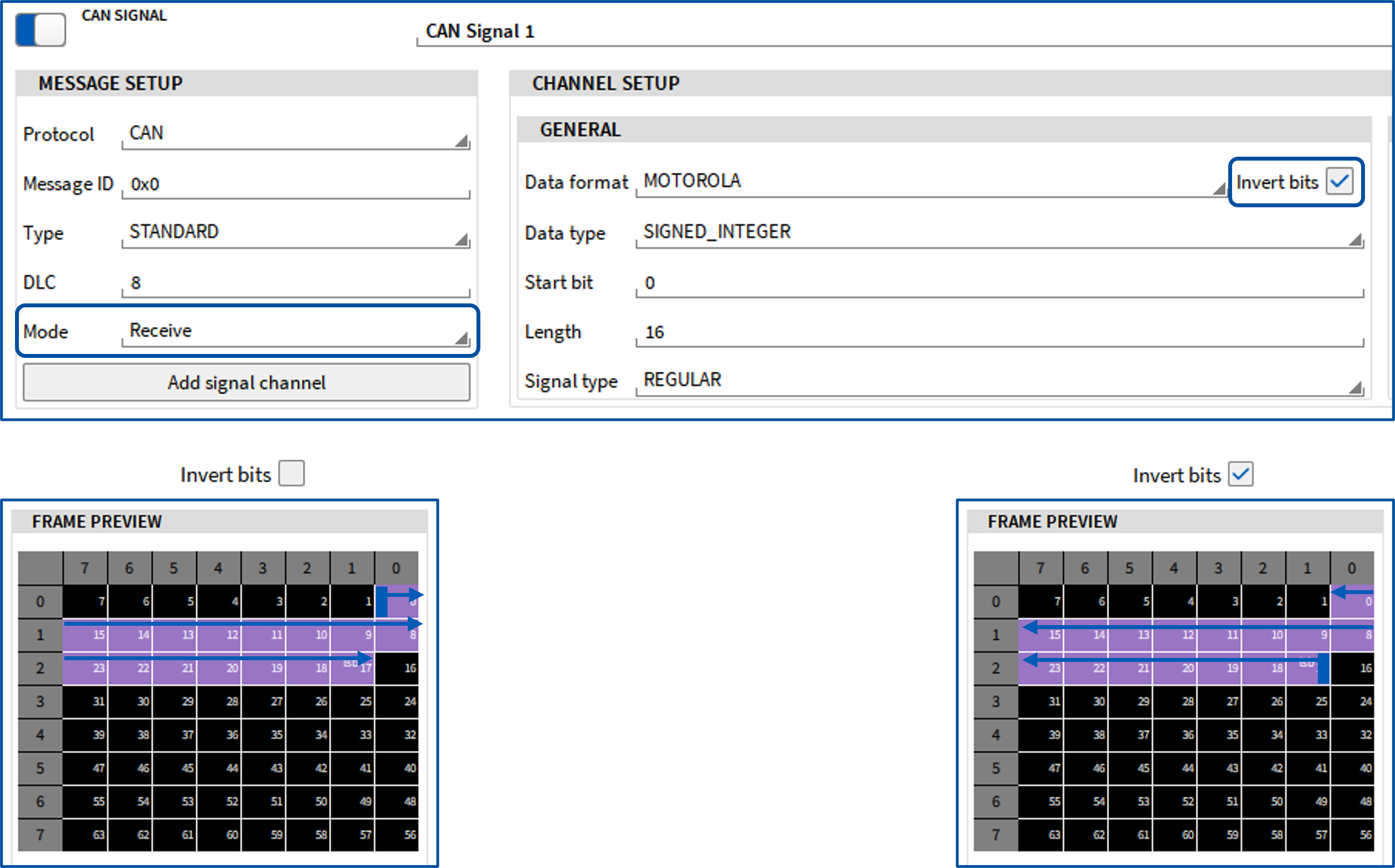
Fig. 7: CAN message configuration for receiving signals with standard and inverted bit order
Enhanced Logging
To provide greater flexibility during debugging and long-term system monitoring, OXYGEN now supports two log file write modes. Besides overwriting the log file at the start of each session, new log entries can also be appended to an existing log file. By default, OXYGEN continues to overwrite the log file whenever a new session is started.
Note: In the event of an unexpected application crash, OXYGEN automatically creates a separate crash log to preserve the relevant diagnostic information.
The logging behavior can be configured in OXYGEN Setup → Advanced Settings → Log File Settings, where the following options are available:
- Write Mode – Select whether logs should be Overwritten or Appended.
- Maximum Log File Size – Define the maximum allowed log file size. Once the specified limit is reached, the log file is automatically overwritten. A value of 0 disables the size limit.
Conclusion
With OXYGEN 8.2, DEWETRON further strengthens the integration of measurement technology into modern automation and control environments. New support for EtherCAT, PROFINET, and XCP Packed Mode enables faster, more efficient data exchange, while workflow enhancements simplify day-to-day measurement tasks.
From real-time power analysis and industrial communication to high-speed data acquisition and intuitive system operation, OXYGEN 8.2 helps engineers build more connected, responsive, and efficient test setups. Whether used in automation, power analysis, validation, or control applications, OXYGEN 8.2 provides a powerful platform for acquiring, analyzing, and sharing measurement data with confidence