
OXYGEN 8.1 - Unlock Real-Time Calculations and Seamless System Integration
OXYGEN 8.1 is the first update in the OXYGEN 8.x release series. This version focuses on real-time power analysis and improved integration into modern test environments, highlighted by the introduction of OXYGEN-hosted server functionality for Modbus and OPC UA. In addition, it brings enhanced digital I/O capabilities, extended SDK support, and a range of further usability improvements and refinements.
New Features
- Real-time Power Calculation
- OPC-UA support
- Modbus Server
- Phase-Locked Statistics
- Extensions for DEWE3-OPT-DIO‘s Digital Outputs
- Usability Updates and Refinements
- OXYGEN-SDK – Python Support
Real-time Power Calculation
OXYGEN 8.1 introduces a new real-time option for power analysis on Linux distributions. The new Real-time tab in the Power Group tool enables fast UDP output of calculated power values with up to 1 kHz update rate and a typical I/O delay of only 2 ms (4 ms max.).
Real-time Power Calculation runs independently from the standard Power Calculation. It supports all wiring types, except Other, and provides typical power channels such as:
- Voltage: RMS, peak-to-peak, average
- Current: RMS, peak-to-peak, average
- Active Power P, Reactive Power Q, Apparent Power S, Power Factor PF
- Waveform data of input channels
If defined in the Power Group, additional channels are available, including:
- DC power values
- Mechanical power values
- Efficiency values
To set up Real-time Power Calculation:
- Enable real-time calculation in the DAQ Hardware settings
- Enable Real-time Power in the Advanced Power Group settings
- Enable UDP output, define the IP address, port, and format, and select the required channels. This step defines where the data should be transferred to. A loopback to the OXYGEN Ethernet Receiver is also possible by using the IP address 127.0.0.1.
Note that the entire UDP packet description can be exported as an XML file.
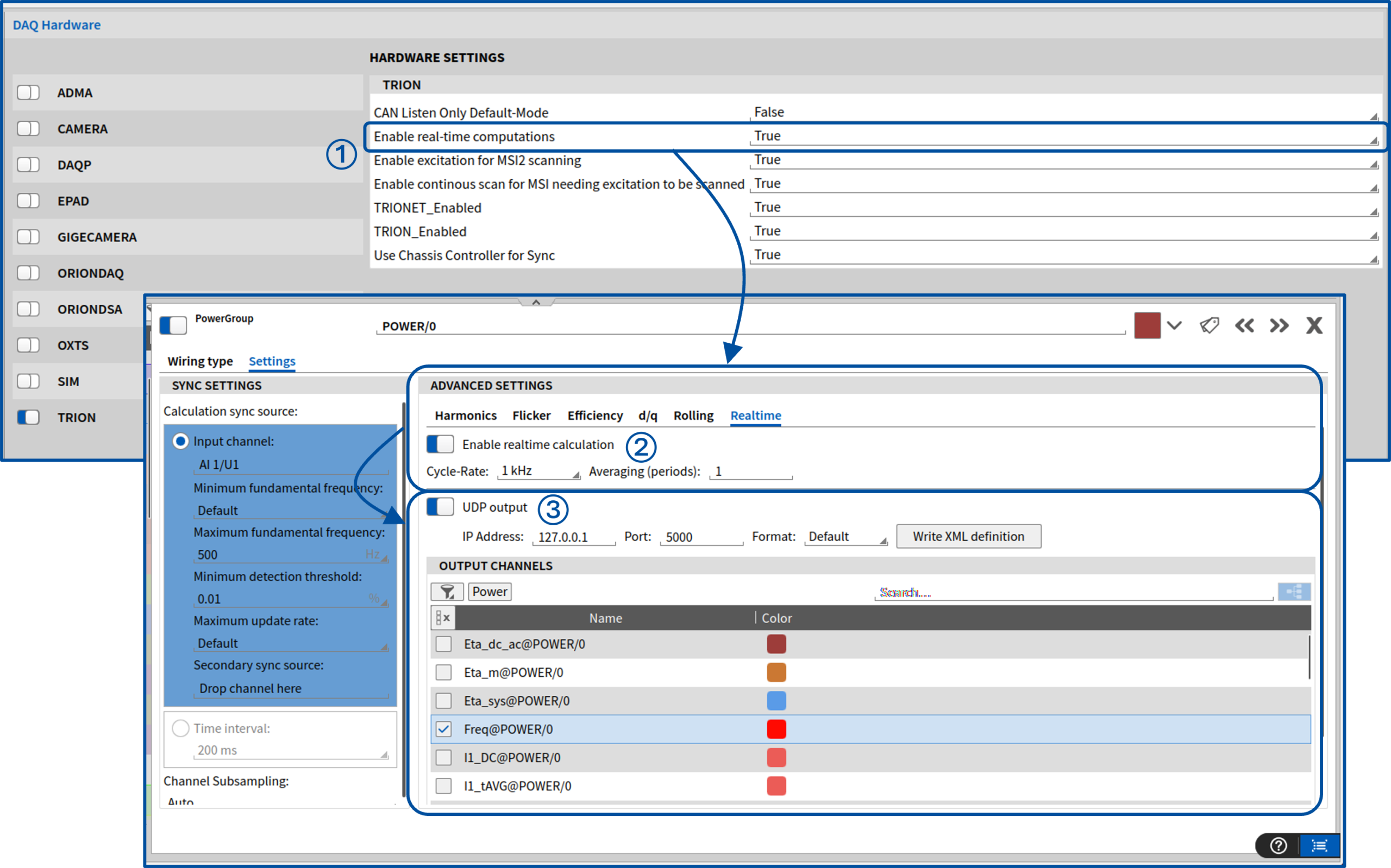
Fig. 1: Setup Realtime Power Calculation
Note:
Requires software option OXY-OPT-POWER-RT
OPC-UA support
Another highlight of this release is the support for Open Platform Communications Unified Architecture (OPC-UA) – a standardized, platform-independent communication protocol for reliable data exchange. OPC UA ensures high security through encryption and signing, as well as authentication and authorization mechanisms, and runs seamlessly across Windows, Linux, and Android systems.
OXYGEN supports both communication models:
- OPC-UA Server (Publish)
- OPC-UA Client (Subscribe)
OPC-UA Server (Publish)
Create and run an OPC-UA Server directly within the OXYGEN measurement software. Configuration options include:
- Port number
- Selection of channels accessible to OPC-UA clients
- Update rate
- Statistical output modes: Last value, Minimum, Maximum, Average, or RMS
This allows you to efficiently provide measurement data to external OPC-UA.
Note:
Requires software option OXY-OPT-OPC-UA-SERVER
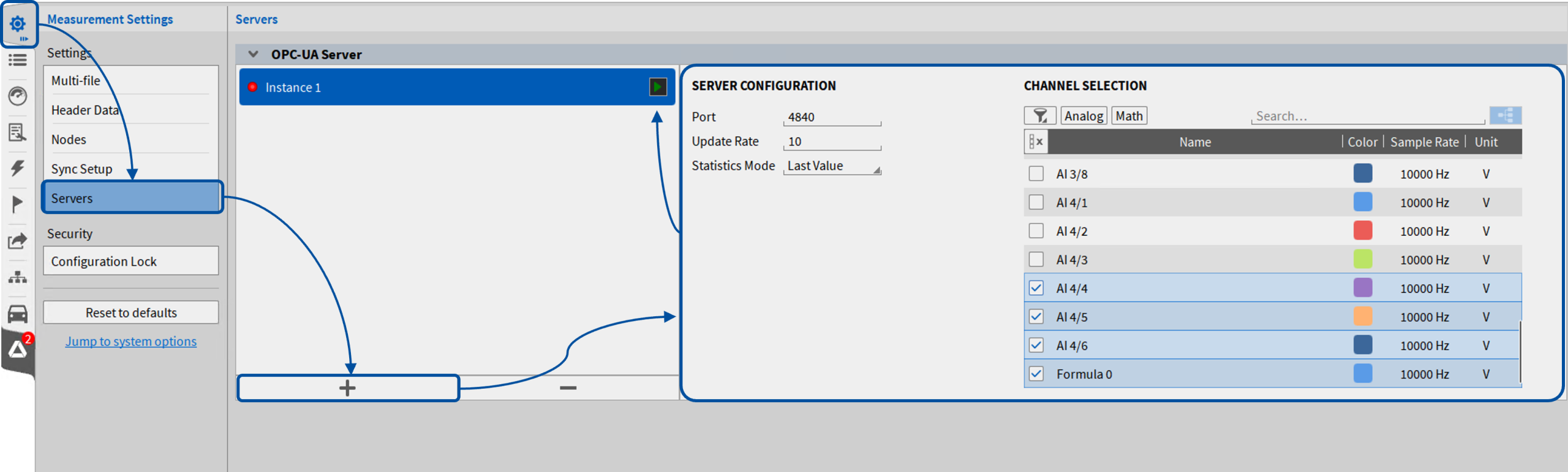
Fig. 2: OPC-UA Server (Publish)
OPC UA Client (Subscribe)
Integrate external OPC UA data streams directly into OXYGEN by adding an OPC UA client to your channel list. You can either configure a new connection or load an existing endpoint. Key features include:
- Selection of time source (client time or server time)
- Configurable publishing interval
- Server status monitoring
- Saving and exporting endpoint configurations (CSV)
You can flexibly choose which channels and data you want to receive. This includes measurement values, sample rates, scaling parameters, and additional metadata. Each imported channel holds detailed information about its original properties and allows you to individually adjust sampling intervals and scaling.
For secure deployments, advanced endpoint settings for security and authentication are fully supported. You can configure OPC UA security policies, manage certificates and private keys for encrypted and signed communication, and use user authentication credentials (username and password). This ensures easy integration into secure OPC-UA environments and compliance with modern IT security requirements.
Fig. 3: OPC-UA Server (Subscribe)
Modbus Server
With OXYGEN 8.1, we extend our Modbus communication by introducing Modbus Server functionality. While previous versions supported only Modbus Client operation, you can now create and run a Modbus Server directly within OXYGEN, enabling seamless data sharing with external Modbus clients. The integrated Modbus Server offers flexible configuration options:
- Definition of IP address and port
- Selection of statistic mode: Last Value or Average
- Support for both synchronous and asynchronous scalar channels
- Wide range of selectable data types: float, double, int16, int32, uint16, uint32
- Polling rates of up to 100 Hz
- Optional Unit Identifier support
- Optional scaling (factor and offset) for value adaptation
To simplify integration, configurations can be exported as XML files for use in Modbus client systems.
Note:
Requires software option OXY-OPT-MODBUS-SERVER
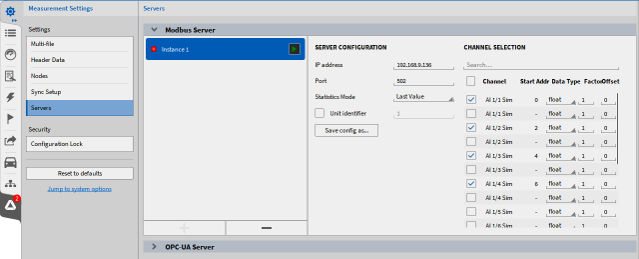
Fig. 4: Modbus Server
Phase-Locked Statistics
We also extended our functionality of statistics channels with a new calculation type, Phase-locked. It allows you to calculate statistical values based on a defined number of signal periods, providing more meaningful insights for periodic signals. Key configurations include:
- The selection of the period source channel, which by default is identical to the statistics input channel but can be reassigned
- The definition of the number of periods used for analysis, ranging from 1 to 1000 periods
- Configurable trigger settings for reliable periodicity detection
In addition to all standard statistical quantities, Phase-Locked Statistics also introduces two new statistical values:
- Frequency: frequency of the analyzed periods
- Period time: duration of a single period
Together, these enhancements improve the analysis of periodic signals, resulting in more stable, meaningful, and application-oriented results.
Extensions for DEWE3-OPT-DIO‘s Digital Outputs
With this release, we’ve enhanced the Digital Output capabilities of the DEWE3-OPT-DIO option on Chassis Controllers, enabling greater flexibility for synchronization, triggering, and signal distribution.
In addition to the standard Digital Out mode, Digital Output channels now support the following signal types:
- FrequencyClock – Continuous clock signal from 1 Hz up to 10 MHz
- PPS (Pulse Per Second) – One pulse per second
- CLK10 – Dedicated 10 MHz continuous clock signal
- IRIG – Pass-through of an IRIG-B signal when used as sync output
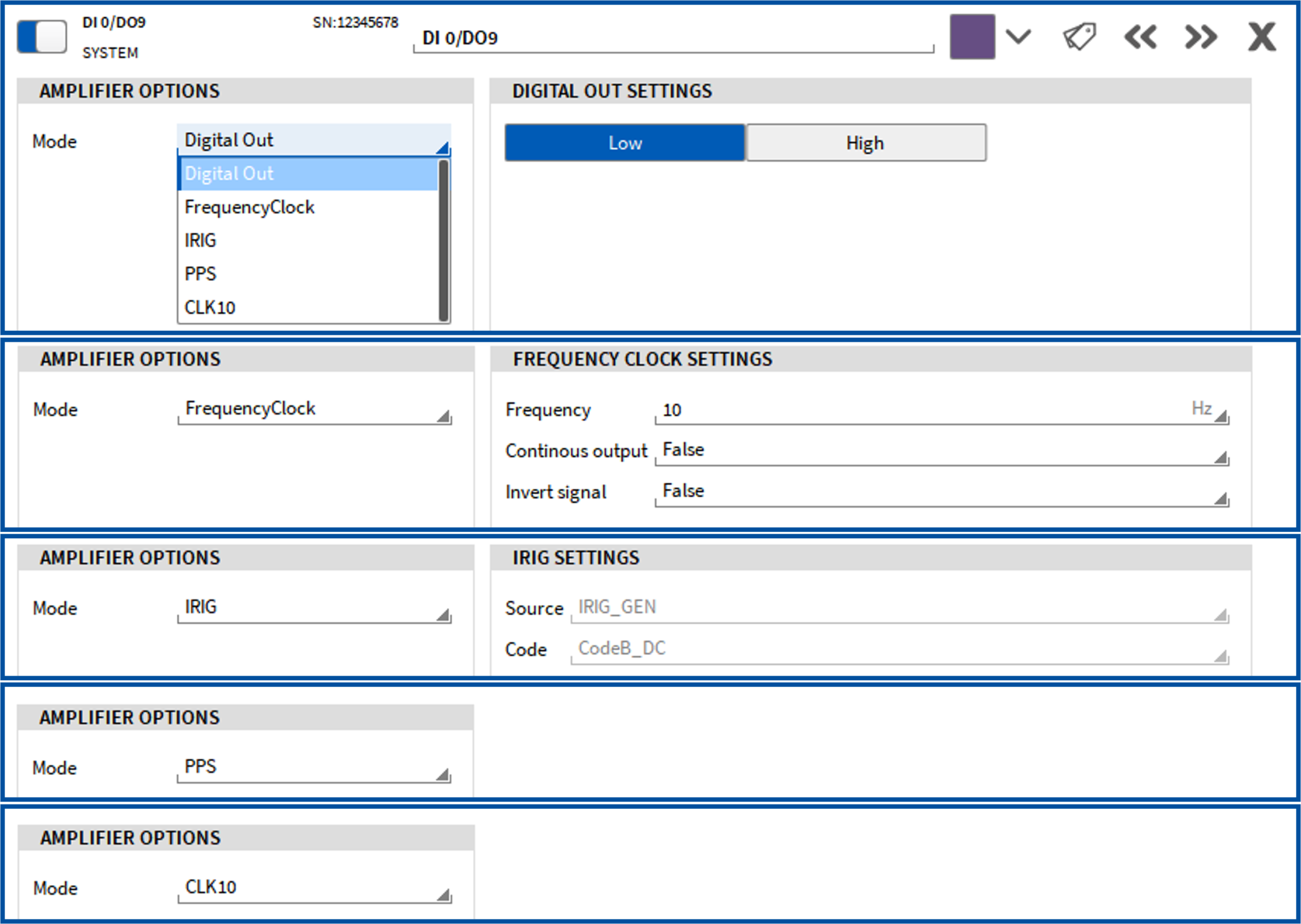
Fig. 5: Extensions for DEWE3-OPT-DIO‘s Digital Outputs
Further, the AUX output pin is now available as a software channel. This virtual channel represents the physical Synchronization Output Connector “AUX” and provides access to the same operating modes: PPS, FrequencyClock, IRIG. Any changes applied to this software channel are directly reflected in the SYNC Out settings. Additionally, the mode CustomSignalOut enables you to forward the configured synchronization signal from the AUX connector. This allows monitoring the Sync Out signal directly as a channel and distributing it to any other Digital Output channels (on the Chassis Controller).
Notes:
– Requires TRION-API and firmware update (not just an OXYGEN update)
– Requires software option DEWE3-OPT-DIO
Usability Updates and Refinements
In addition to the major feature enhancements, OXYGEN 8.1 introduces several smaller improvements that further refine usability and system flexibility.
CAN-OUT – Averaging Skipped Output Channels
The CAN transmission settings now include a new Output Mode option. When set to Average (default), a block-wise linear average is calculated and output for all samples within the defined output period. Alternatively, selecting Last_Value restores the previous behavior, where only the last valid sample is transmitted.
Resolver Plugin – Smoothed Speed Output
To improve signal quality, a running statistics filter with a definable filter length (1-1000 ms) is now available in the resolver plugin. This allows smoothing of the speed output signal, resulting in more stable and reliable measurements.
Quick Access to Favorite Calculations
Your first four favorites from the Add Channel menu are now displayed directly at the bottom of the channel list. This replaces the previous Power Group button, making access faster and more flexible for various operations.
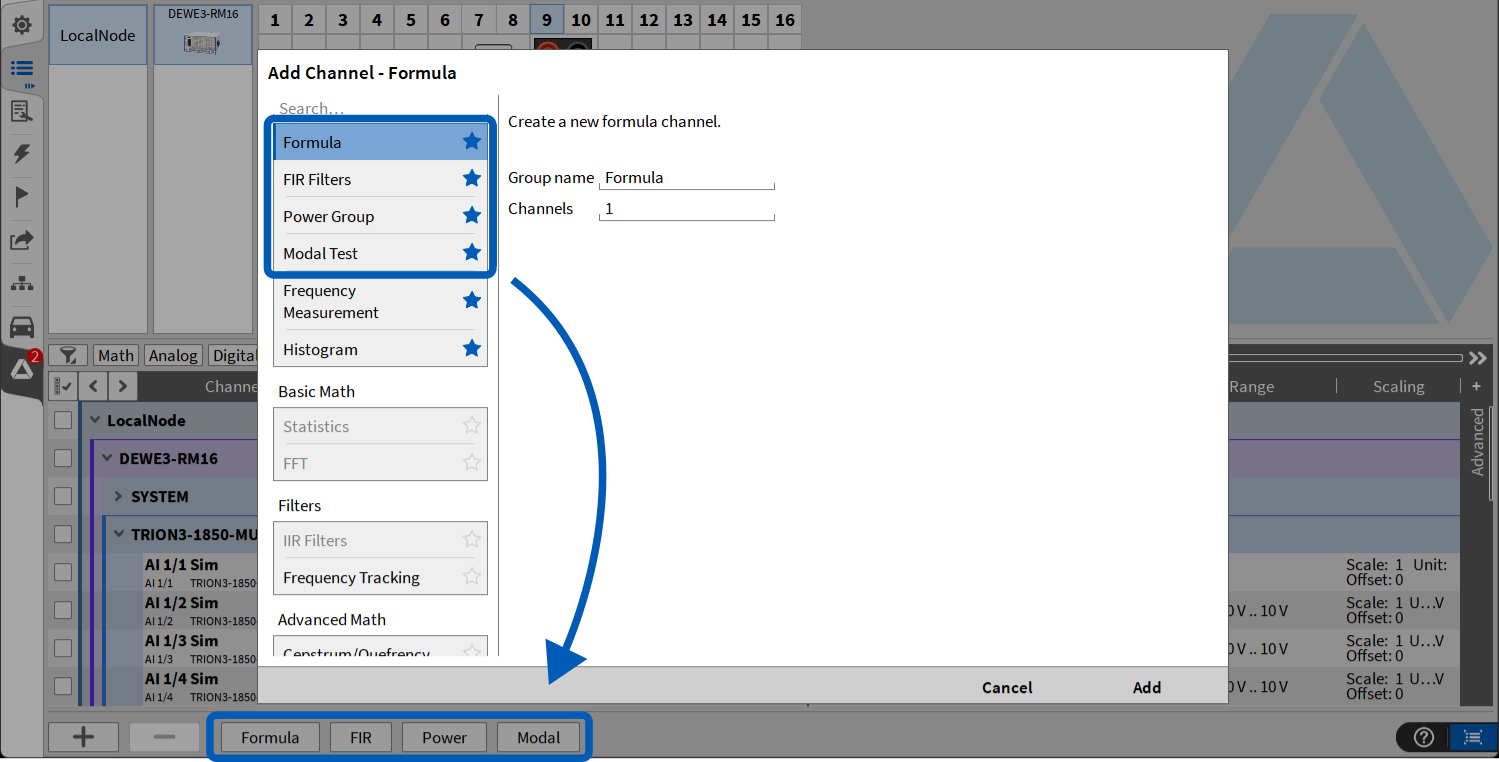
Fig. 6: Quick Access to Favorite Calculations
Time Format Information in Recorder Instruments
Recorder instruments, such as Chart Recorder, Recorder, and Scope, can now display the time format information (absolute and relative time), improving clarity during data analysis and review.
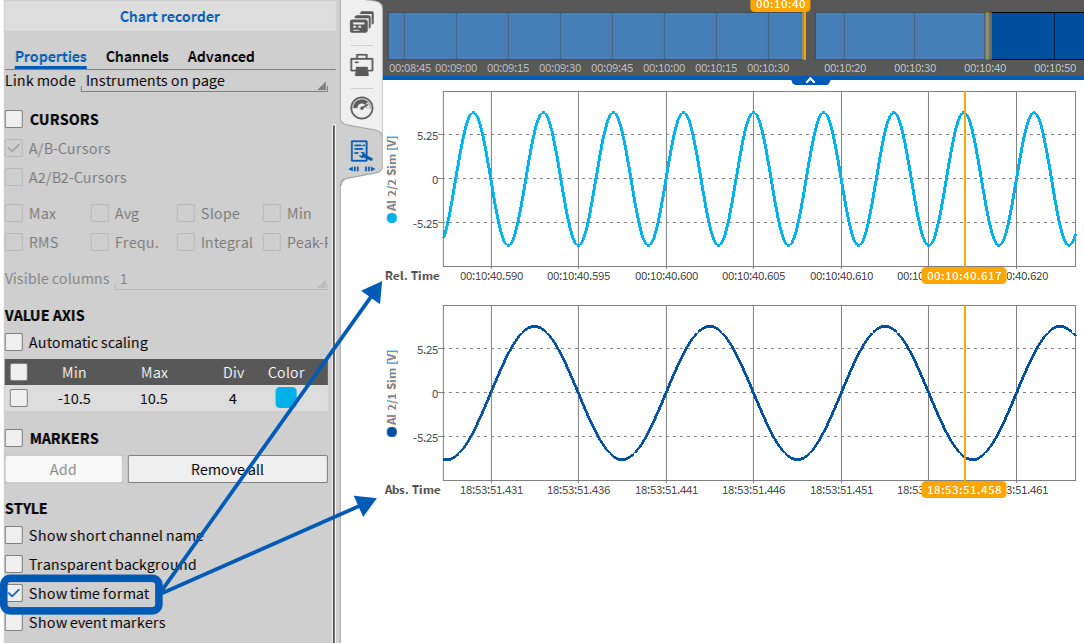
Fig. 7: Time Format Information in Recorder Instruments
XCP – Screen Lock Behavior
When an active XCP connection is established, the screen lock is now automatically disabled.
SCPI – Parallel Connections
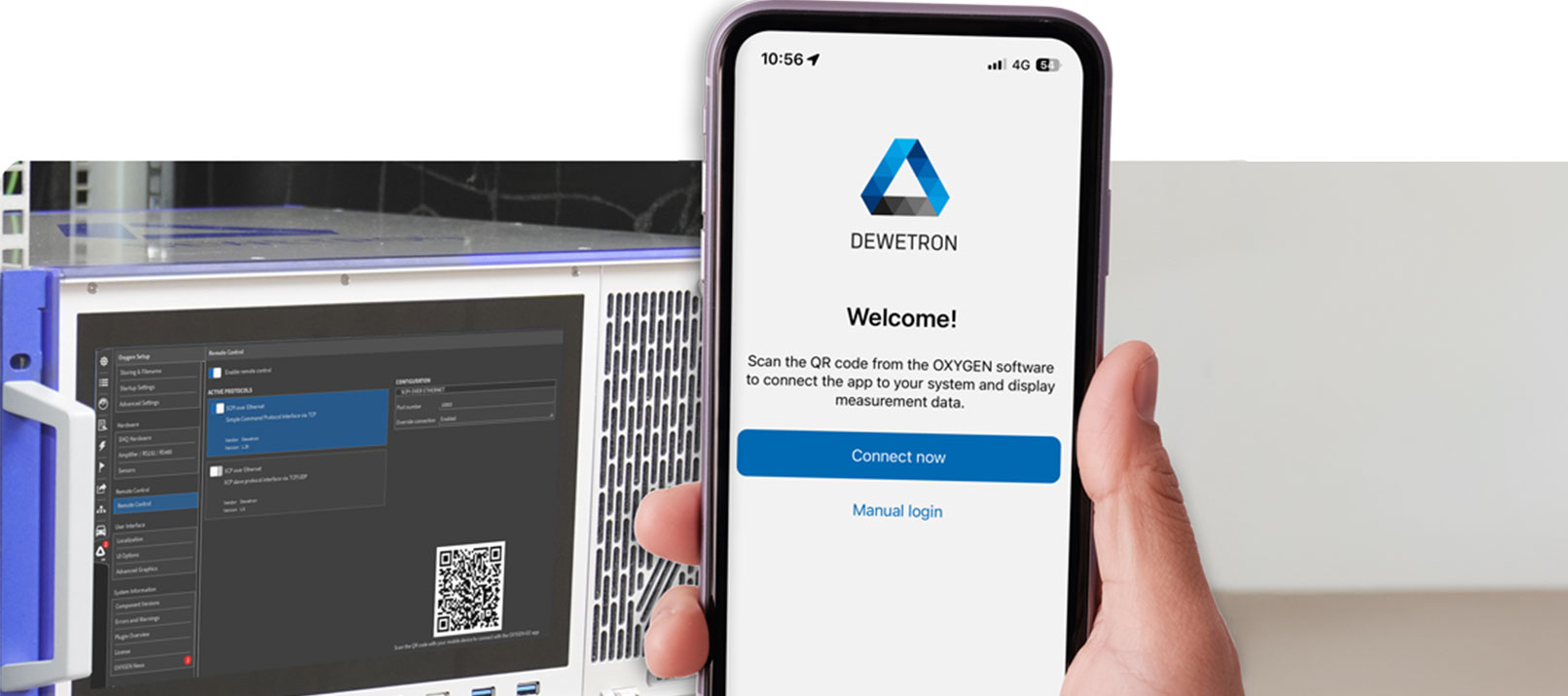
OXYGEN 8.1 now supports multiple parallel SCPI connections to a single host. This enables simultaneous use of tools such as OXYGEN-GO alongside SCPI-based remote systems, allowing for more flexible and advanced test setups.
OXYGEN-SDK – Python Support
In addition to the above-mentioned OXYGEN feature updates, we have significantly expanded the OXYGEN-SDK (ODK) by introducing Python support. This allows you to develop custom software channels in Python, similar to what is possible with the C++-based ODK.
With this addition, you can register new channel types directly in the Add Channel dialog, create output channels with custom properties, and fully customize both the Add Channel and Channel Details pages using QML. Localization is also supported, enabling translation of property names and user interface texts.
From a technical perspective, Python plugins run in their own dedicated process to ensure the stability of OXYGEN. They can either be started automatically by OXYGEN or executed manually within a debugger, which simplifies development and testing workflows. The implementation supports Python versions 3.12 to 3.15 as well as NumPy 2.x, providing access to a modern scientific computing stack. For further details and practical examples, please refer to our GitHub repository.
Note:
While Python offers greater flexibility and ease of development, it is important to note that performance will be lower compared to a comparable C++ plugin. This is due to the Python interpreter, multithreading limitations, and additional data transfer overhead.